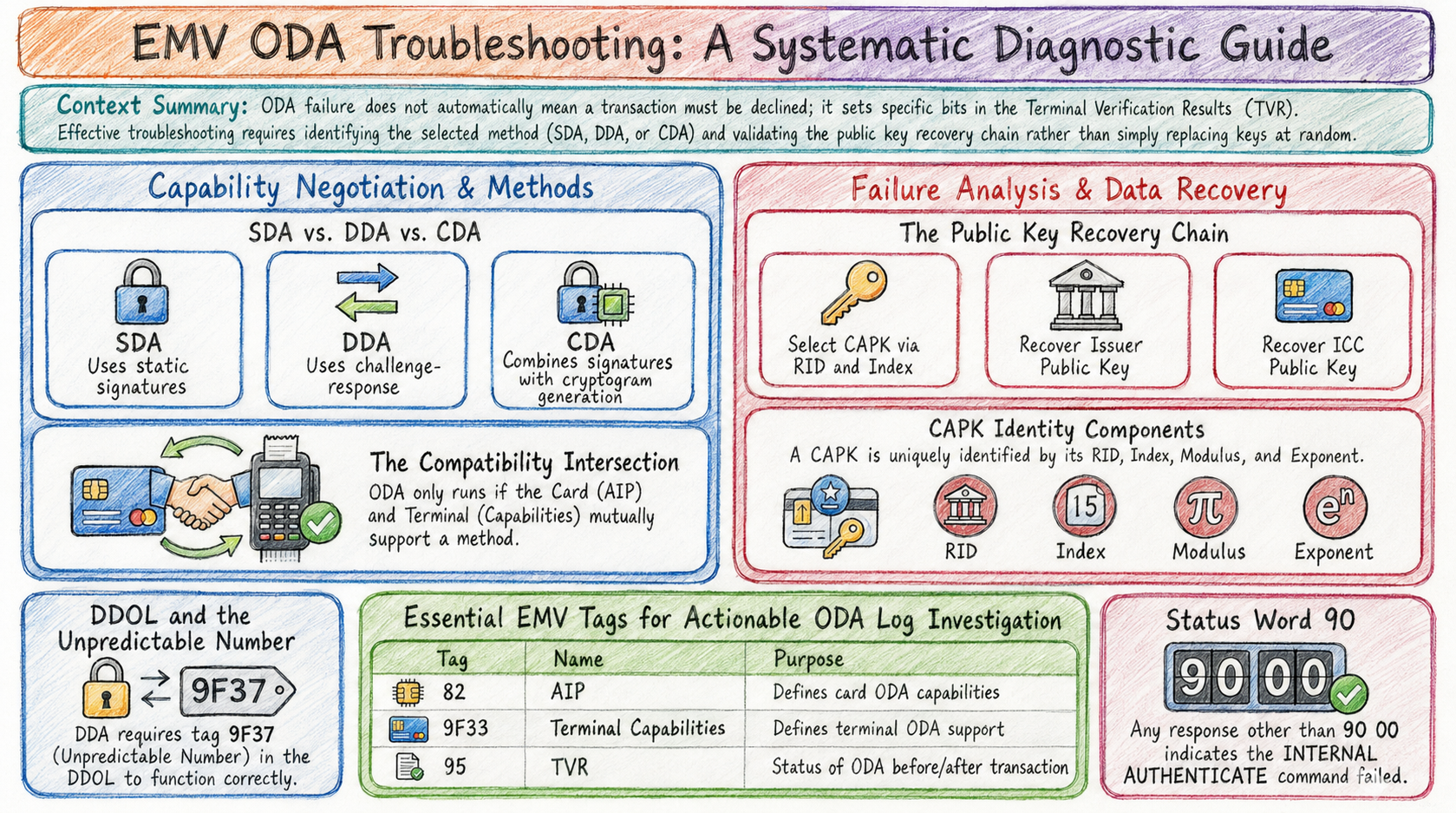
When Offline Data Authentication (ODA) fails, replacing Certification Authority Public Keys (CAPKs) at random is rarely productive. Most field failures sit earlier in the chain: the wrong method was selected, INTERNAL AUTHENTICATE never ran, the DDOL was incomplete, or certificate recovery broke at a specific step.
This post is a contact-chip ODA troubleshooting path. It starts from capability negotiation, then covers missing INTERNAL AUTHENTICATE, DDA failures after a successful APDU, CAPK selection and lifecycle, and what to log. The cryptographic model is the same one in POINT OF SALE ARCHITECTURE (the book), Chapter 3: CAPKs as terminal trust anchors, and ODA as local card authenticity before GENERATE AC. For CAPK hierarchy and fleet management in more depth, see CAPKs: The Cryptographic Trust Anchors Behind Every EMV Transaction.
ODA failure also does not mean “must decline.” It sets Terminal Verification Results (TVR) bits; Terminal Action Analysis then chooses AAC, ARQC, or TC. That path is covered in Why an EMV Contact Transaction Was Declined.
First establish which authentication method should run
The Application Interchange Profile (AIP, tag 82) declares the card application’s offline authentication capabilities. Terminal Capabilities (tag 9F33) declares what the terminal supports. The Application File Locator (AFL, tag 94) tells the terminal which records to read and include in the authentication input.
EMV defines three ODA methods, in increasing strength:
| Method | Mechanism |
|---|---|
| SDA | Terminal verifies a static issuer signature over card data |
| DDA | Challenge-response: card signs terminal dynamic data; terminal verifies with the ICC public key |
| CDA | Dynamic signature combined with Application Cryptogram generation |
Do not infer support from the card or terminal alone. ODA runs only when the transaction profile, AIP, terminal capabilities, and kernel configuration agree on a method. If that intersection is empty, the kernel will not perform ODA, and the TVR will typically record that offline data authentication was not performed.
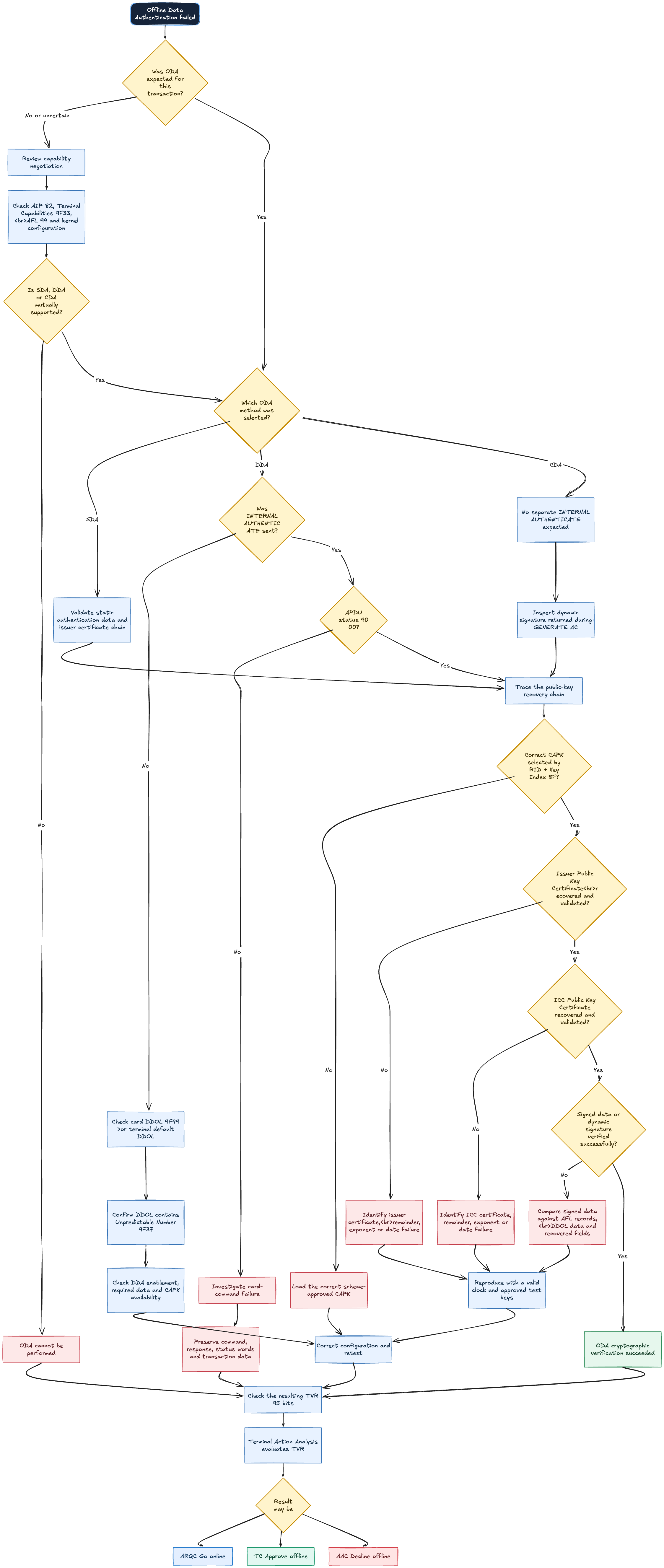
When INTERNAL AUTHENTICATE is not sent
For DDA, the terminal sends INTERNAL AUTHENTICATE with data assembled from the Dynamic Data Authentication Data Object List (DDOL). EMV Book 2 requires that list to include the terminal Unpredictable Number (tag 9F37). If the card does not supply a DDOL, the terminal must use its default DDOL. If neither side provides a usable DDOL that includes 9F37, DDA fails.
CDA is different: the dynamic signature is produced during GENERATE AC, not via a separate INTERNAL AUTHENTICATE. Absence of INTERNAL AUTHENTICATE is therefore expected when CDA is selected.
If DDA was expected and the command is absent:
- Confirm that both card and terminal support DDA, or determine whether the kernel selected CDA instead.
- Check the kernel configuration that enables the relevant ODA method.
- Confirm that a usable DDOL was read from the card (tag
9F49when present). - If the card does not provide a DDOL, confirm that the terminal has the required default DDOL and that it includes
9F37. - Verify that the required CAPK is available before authentication begins.
The absence of INTERNAL AUTHENTICATE is not itself proof of a DDA defect. The kernel may have selected CDA, may have found no mutually supported ODA method, or may have stopped because required data was unavailable.
Open the image below for the full diagnostic path (or click to view full size).
If INTERNAL AUTHENTICATE is sent but DDA fails
Inspect the APDU response first. A status other than 90 00 means the command did not complete successfully. Preserve the command data, response data, status words, selected AID, AIP, DDOL, and unpredictable number in the trace.
If the APDU succeeds, continue through the public-key recovery chain described in EMV Book 2:
- Select the CAPK by the card application’s Registered Application Provider Identifier (RID)—the first five bytes of the selected AID—and the Certification Authority Public Key Index (tag
8F). - Recover and validate the Issuer Public Key Certificate.
- Recover and validate the ICC Public Key Certificate.
- Verify Signed Dynamic Application Data against the DDOL concatenation and related recovered fields.
A failure at any link should be reported as a specific recovery or verification error, not only as the generic label “ODA failed.” Chapter 3 makes the same architectural point: (RID + Key Index) selects the terminal-resident trust anchor; missing or wrong CAPKs break certificate recovery before signature verification ever runs.
CAPK selection and lifecycle
A CAPK record is identified by at least:
- RID
- CAPK index
- Modulus
- Exponent
The integrity hash (commonly SHA-1 over the key material under scheme distribution rules) and the expiration date are operational metadata. Expiration is not a substitute for checksum validation, and changing an expiration date in production to silence errors is not a valid fix.
Treat CAPKs as managed production configuration:
- Obtain keys from the relevant payment scheme or approved distribution channel.
- Validate integrity before deployment.
- Track effective and expiration dates outside the transaction hot path.
- Load only keys authorized for the deployed markets and applications.
Interpretation note: some vendor kernels accept a CAPK when it is loaded and may not enforce expiration during every transaction. That behavior, where it occurs, does not remove the application owner’s responsibility to maintain a current, scheme-approved key set. Certification and scheme operating rules still assume the terminal estate carries valid keys.
A safer way to isolate certificate-date problems
Changing a production terminal’s clock to an old date is not a safe diagnostic method. The terminal date feeds multiple EMV checks, so a clock skew can create secondary failures that look like ODA defects.
Reproduce the transaction in a controlled certification or development environment, inspect certificate expiration data, and test with a known-good clock and scheme-approved test keys. Keep production time synchronized and auditable.
What to log
For an actionable ODA investigation, collect:
- Selected AID and RID
- AIP (
82) and Terminal Capabilities (9F33) - CAPK Index (
8F) - DDOL, if present, and the terminal default DDOL
INTERNAL AUTHENTICATEcommand and response (when DDA is in use)- AFL and the application records used for authentication
- TVR (
95) before and after ODA - Kernel-specific ODA debug code, when available
- Kernel version and configuration identifier
Vendor debug APIs can return a more specific reason, but their codes must be interpreted with the guide for the exact certified kernel build.
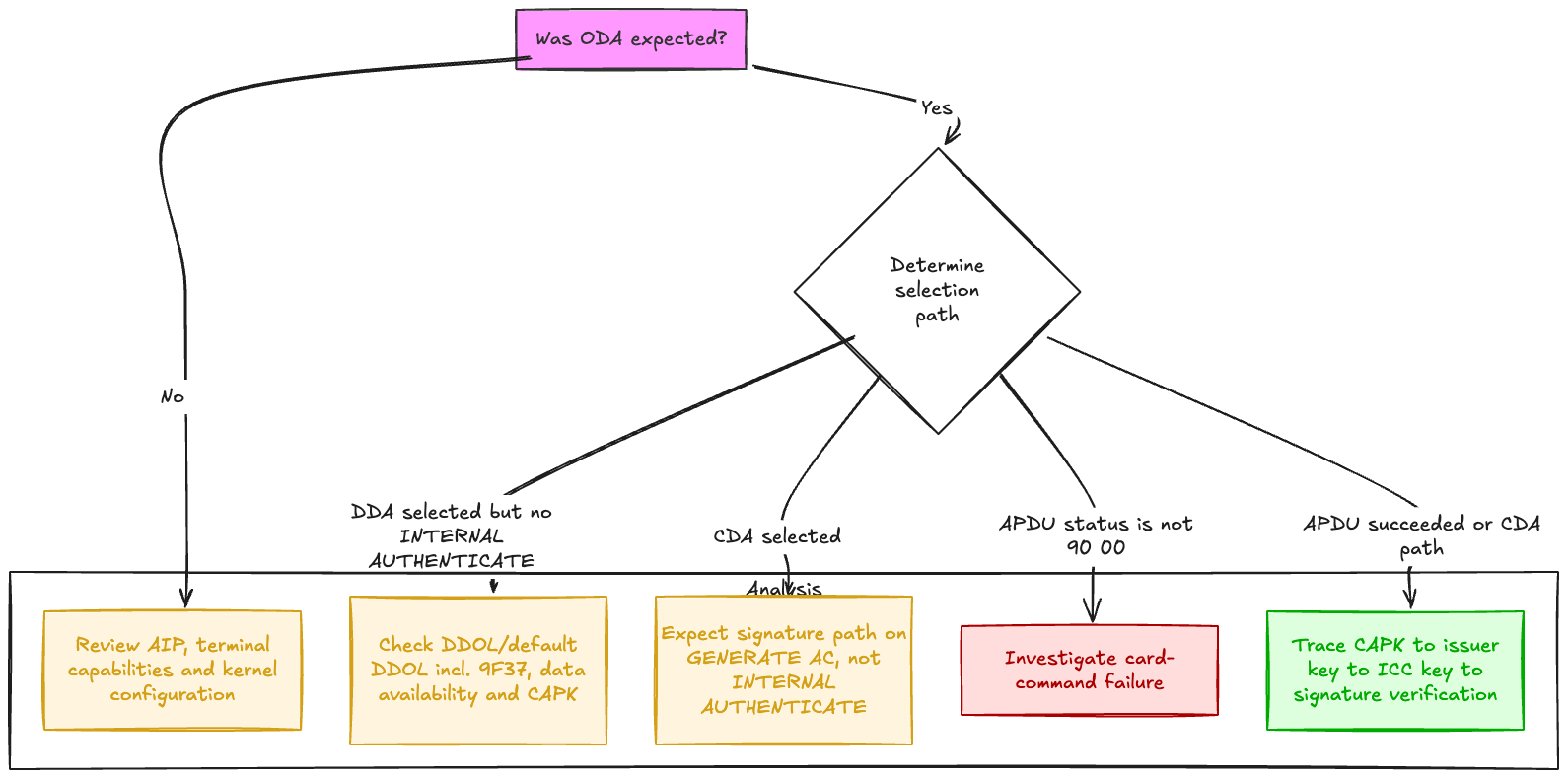
Practical diagnosis flow
References
- POINT OF SALE ARCHITECTURE: A Practical Guide to Secure, Certifiable POS Systems — Chapter 3: EMV Principles (CAPKs, certificate chain, SDA/DDA/CDA, AIP/AFL, and ODA placement before
GENERATE AC). - CAPKs: The Cryptographic Trust Anchors Behind Every EMV Transaction
- Why an EMV Contact Transaction Was Declined
- EMVCo — EMV Contact Chip
- EMVCo — Contact Kernel Approval Process
- EMVCo — Specifications and Associated Bulletins
- EMV Integrated Circuit Card Specifications for Payment Systems, Book 2: Security and Key Management — SDA, DDA, CDA, certificate recovery, CAPKs, DDOL requirements.
- EMV Integrated Circuit Card Specifications for Payment Systems, Book 3: Application Specification — AIP, AFL, terminal data objects, and transaction flow.
- CardContact OpenSCDP — DDA — worked walkthrough of CAPK → issuer → ICC recovery and
INTERNAL AUTHENTICATE.